adsenservice
Related Articles

AI image generators have made it much easier to create images without professional graphic design skills. With a simple text prompt, you can create realistic photos, illustrations, product images, social media graphics, blog visuals, and many other types of digital content.
However, getting a good result from an AI image generator is not always as simple as writing a few words and clicking generate. I have found that many disappointing AI images are not necessarily caused by the tool itself. In many cases, the problem is the prompt.
A poorly written prompt can produce an image that looks completely different from what you imagined. The good news is that most common AI image prompt mistakes are easy to avoid once you understand how AI image generation works.
In this article, I will explain the most common AI image prompt mistakes and share practical ways to avoid them so you can create better images with AI tools.
What Is an AI Image Prompt?
An AI image prompt is a written description that tells an AI image generator what you want it to create.
For example, you could write:
“Create a realistic photo of a modern laptop on a wooden desk with a coffee cup, notebook, and green plant, natural daylight, professional photography.”
The AI uses the information in the prompt to understand the subject, environment, style, lighting, and other visual details.
The better your instructions are, the easier it becomes to guide the image generator toward the result you want.
1. Writing Prompts That Are Too Short
One of the most common AI image prompt mistakes is using a prompt that is too short.
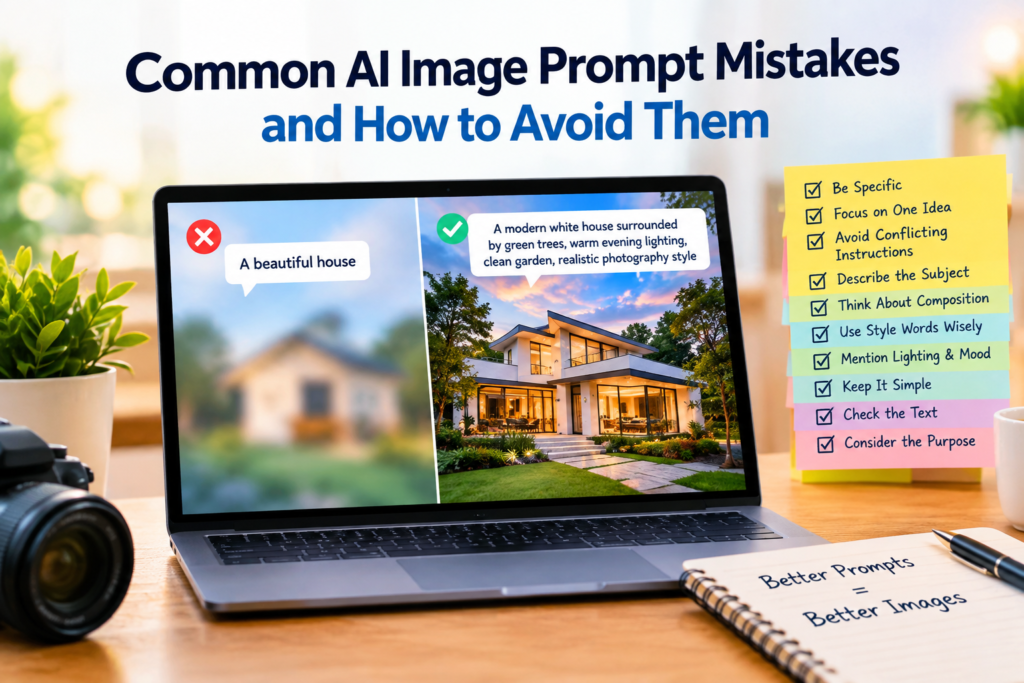
If you simply write “a beautiful office,” the AI has to make many decisions for you. It needs to decide what type of office, what furniture, what lighting, what camera angle, what style, and what environment should be included.
Sometimes the result may look good, but it may not match your original idea.
I recommend giving the AI enough information to understand your vision. You do not have to write a huge paragraph. Just mention the important details.
Instead of “modern office,” try something like “a bright modern home office with a wooden desk, laptop, bookshelf, indoor plants, natural window light, and a clean professional atmosphere.”
This gives the AI much more direction.
2. Being Too Vague
Another common mistake is using vague words without explaining what they mean.
Words such as “nice,” “beautiful,” “amazing,” and “professional” can mean different things to different people.
For example, if you write “create a beautiful landscape,” the AI does not know whether you want mountains, a beach, a forest, or a city view.
Instead, describe the visual elements you actually want.
You could write “a peaceful mountain landscape with a blue lake, green pine trees, snow covered peaks, soft morning sunlight, and a realistic photography style.”
Specific descriptions usually make AI image prompts easier to understand.
3. Adding Too Many Unrelated Ideas
While detailed prompts can be helpful, adding too many unrelated ideas can create another problem.
I have noticed that when a prompt contains several different subjects, locations, styles, and moods, the AI may struggle to create a consistent image.
For example, asking for a futuristic city, a peaceful countryside, a historical castle, a modern office, and a tropical beach in one realistic scene can create confusing results.
Try to keep the main idea focused.
If you need several different concepts, it is usually better to generate separate images rather than putting everything into one prompt.
4. Not Describing the Image Style
Another AI image prompt mistake is forgetting to mention the visual style.
The same subject can look completely different depending on the style you choose.
You might want a realistic photograph, digital illustration, watercolor painting, 3D render, cartoon, cinematic scene, or minimalist graphic.
If style matters for your project, mention it in the prompt.
For example:
“Create a realistic product photograph of a wireless headphone on a clean white table.”
This is very different from:
“Create a colorful 3D illustration of a futuristic wireless headphone.”
Both prompts describe headphones, but the requested styles are completely different.
5. Ignoring Lighting
Lighting can have a major effect on the final image.
Many beginners focus on the subject and background but forget to mention lighting.
If you want a bright and professional image, you can request natural daylight or soft studio lighting. If you want a dramatic image, you can request cinematic lighting or strong shadows.
For example:
“Professional product photography with soft studio lighting and subtle shadows.”
This gives the AI additional information about the atmosphere you want.
You do not need to mention lighting in every prompt, but it can be extremely useful when the mood of the image matters.
6. Not Mentioning Composition
Composition describes how the elements are arranged in an image.
This becomes especially important when creating images for websites, blog posts, advertisements, and social media.
For example, if you want to add a title on the right side of a blog featured image, you can ask for the main subject to be positioned on the left with clean empty space on the right.
Without this instruction, the AI might place the main subject directly in the center.
For my own content, I find composition instructions particularly useful because the image often needs to work together with text or other page elements.
7. Using Conflicting Instructions
AI image generators can become confused when instructions contradict each other.
For example, asking for a “dark night scene with bright midday sunlight” creates conflicting information.
Similarly, requesting both a “minimalist empty room” and a room “filled with furniture and decorations” can produce an unpredictable result.
Before submitting your prompt, read it once and make sure the instructions support the same visual idea.
A clear prompt usually has a clear direction.
8. Expecting Perfect Text Inside Images
AI image generators have improved significantly at creating text, but text generation can still require attention.
If you need a poster, advertisement, thumbnail, or graphic containing important words, do not assume that the AI will always spell everything correctly.
For important website graphics, I personally prefer generating the main visual first and adding the final text separately using a design tool.
This gives you much better control over spelling, fonts, positioning, and branding.
If you do ask the AI to include text, keep it short and simple.
9. Forgetting the Intended Image Size
Another mistake is creating an image without considering where it will be used.
A blog featured image, Instagram post, YouTube thumbnail, website banner, and mobile advertisement may require different dimensions.
Before writing your prompt, think about the final destination of the image.
If the image is for a website banner, you may want a wide composition. If it is for a mobile social media post, a vertical composition may work better.
Planning the format before generation can save time later.
10. Changing Too Many Things at Once
When an AI generated image is almost correct, it can be tempting to completely rewrite the prompt.
I think a better approach is to identify the specific problem.
If the background is good but the lighting is wrong, change the lighting.
If the subject is correct but the camera angle is not what you wanted, modify the camera angle.
If you change everything at once, it becomes difficult to understand which instruction improved or damaged the result.
Small adjustments can often produce better results than starting from zero.
11. Not Using Reference Images When Available
Some AI image tools allow users to provide reference images.
A reference image can help communicate the desired composition, appearance, color direction, or general visual style.
For example, if you want a product image with a particular arrangement, a reference image may provide information that is difficult to explain using words alone.
However, you should make sure you have the appropriate rights to use any image you upload, especially for commercial projects.
12. Expecting One Prompt to Be Perfect
One of the biggest mistakes beginners make is expecting the first generated image to be perfect.
AI image generation is often an iterative process.
I usually think of the first generation as a starting point. After seeing the result, I can identify what needs improvement and modify the prompt.
Maybe the subject is too large. Maybe the background is too busy. Maybe the lighting is too dark.
Instead of becoming frustrated, use the first result as feedback.
This approach can make AI image generation much easier.
How to Write Better AI Image Prompts
A simple structure can help you create more effective prompts.
Start with the main subject. Then describe the environment, visual style, lighting, composition, and any important details.
For example:
“Create a realistic photo of a young professional working on a laptop in a modern home office, natural daylight from a large window, clean desk, indoor plants, professional photography style, wide composition with empty space on the right.”
This prompt clearly explains what should appear in the image and how the final image should look.
You can then modify individual parts depending on the result.
Final Thoughts
Learning how to write effective AI image prompts takes some practice. The most common AI image prompt mistakes usually come from being too vague, adding conflicting instructions, forgetting composition, ignoring lighting, or expecting the first result to be perfect.
The good thing is that you can improve quickly by experimenting.
My advice is to start with a clear idea, describe the important visual details, choose an appropriate style, and then improve your prompt based on the generated result.
You do not need complicated words or extremely long prompts. What matters most is clarity.
AI image tools are becoming increasingly useful for bloggers, content creators, marketers, students, designers, and business owners. When you learn how to communicate your ideas clearly through prompts, you can get much more useful results from these tools.
The goal is not simply to generate an image. The goal is to use AI to turn your creative idea into a visual that actually serves a purpose.